How to Exchange Currencies on EZDEX
 Krishna
 Published:
 Updated:
 Read time:5 Minutes
Table of contents
EZDEX, as one of the reputable platforms for managing and exchanging digital assets, provides users with the possibility of fast and secure conversion of various currencies. The conversion process in this platform is designed in such a way that, in addition to simplicity, it also provides the necessary security and transparency. In this article, the steps of asset conversion in EZDEX will be reviewed step by step, and the key points that must be observed to carry out a successful transaction will be explained.
Step 1: Transferring Assets to the EZDEX Wallet
Before starting the conversion process, the user must transfer the desired asset, which they intend to convert, to their dedicated account wallet in EZDEX. To do this, simply go to the wallet section of your account and select the deposit option next to the name of the desired currency.
This transfer is possible through various deposit methods provided on the platform.
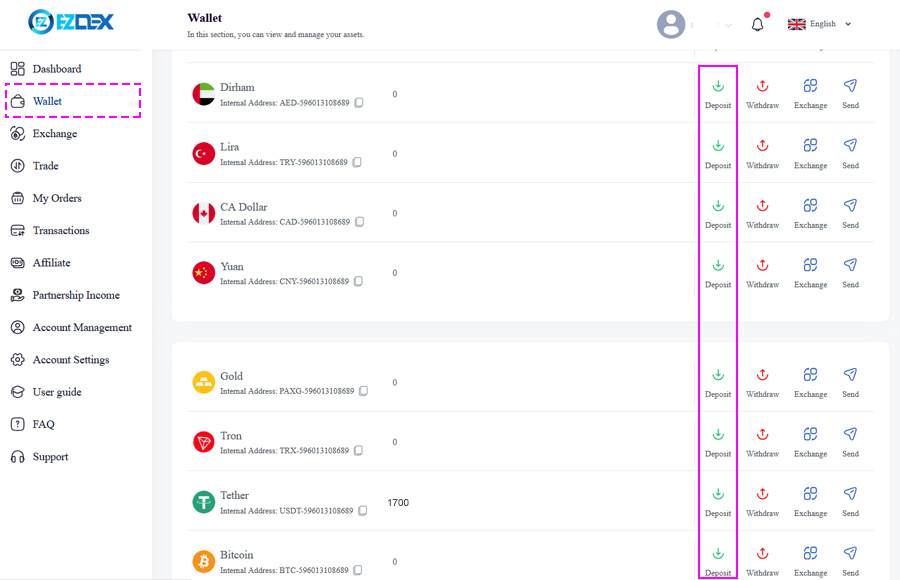
You can transfer your fiat assets to your EZDEX account via bank deposit methods or cash deposit.
In the transfer of cryptocurrency assets, selecting the correct network and deposit address at this stage is of great importance, because any error in entering the information may lead to the loss of the asset.
Step 2: Entering the "Exchange" Section
After completing the deposit and confirming the balance in the wallet, the user must go to the "Exchange" section. This section has a simple user interface and allows users to quickly exchange their assets.
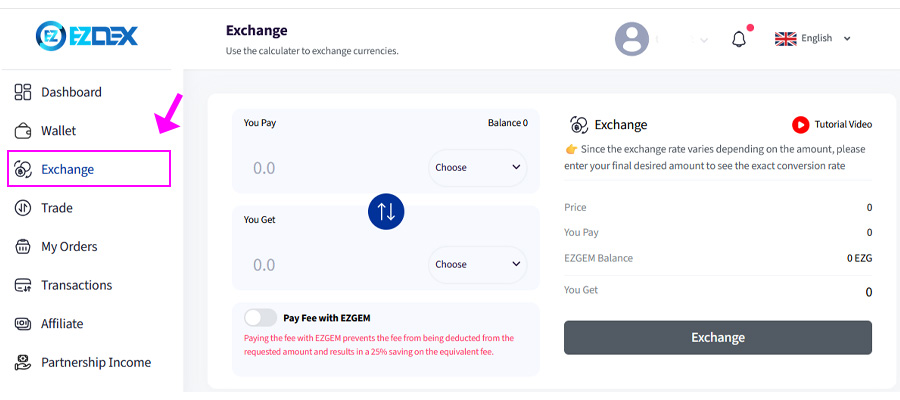
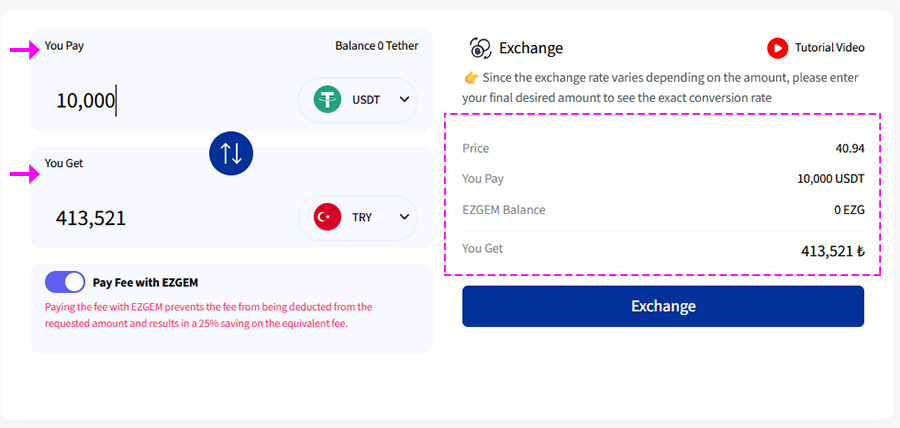
Step 3: Completing the Fields
- First field: Selecting the source currency and specifying the desired amount for conversion.
- Second field: Selecting the target currency that the user intends to receive.
By completing these fields, the system automatically calculates the real-time conversion rate and prepares a transaction preview.
Step 4: Reviewing the Invoice
At this stage, the user sees the invoice including the conversion rate, the received amount, and the transaction details. The important points in this section are as follows:
⏰ Time limitation
Due to real-time market fluctuations, the invoice is valid for only 1 minute. If this time frame expires, the user must submit a new request.
💲 Rate differences based on account level
The conversion rate will vary depending on the user level as well as the amount entered in the source currency. Therefore, it is recommended that before confirmation, the final amount for conversion is definitely entered so that the exact rate is displayed.
💎 Using EZGEN
EZGEM is a special feature in EZDEX that provides access to the best conversion rates in any transaction volume. Users can refer to the provided tutorial to learn more about how to purchase or receive free EZGEM.
Step 5: Final Confirmation & Completing the Transaction
If satisfied with the conditions displayed in the proforma invoice, the user must select the "Confirm" button. By doing this, the conversion process will be carried out instantly, and the target currency will be immediately deposited into the related wallet.
Step 6: Checking Balance & Withdrawal
After completing the conversion, the user can go to their wallet and view the new balance. If desired, it is also possible to withdraw or transfer the asset to other addresses.
Conclusion
In the end, converting assets in EZDEX is a fast, secure, and user-friendly process that, with observing a few simple points, can create a smooth and professional experience for users. Awareness of time limitations, rate differences, and optimal use of the EZGEM feature are among the factors that allow users to get the most out of this platform.
❓ If you have any questions in this regard, you can contact support or raise your question in the comments section.
Latest in EZDEX Tutorials
All articles in this category